

Aside from exploring its futuristic vast virtual world, battle gameplay is one of the great lures of the great Open-World MMORPG, Tower of Fantasy.
It offers a combination of interactive combat, wide weapon selections, complex mechanics, and a lot more. We’ve already talked about the best relics in the game, so we’ve got that covered, but now it’s time to get a bit more in-depth.
In this article, we will talk about one of the main highlights of Tower of Fantasy’s gameplay, the weapon charging system.
But before going there, why don’t we first explore what makes charging weapons fun? Let’s talk about these super moves, the discharge attacks.
How do discharge attacks work in Tower of Fantasy?
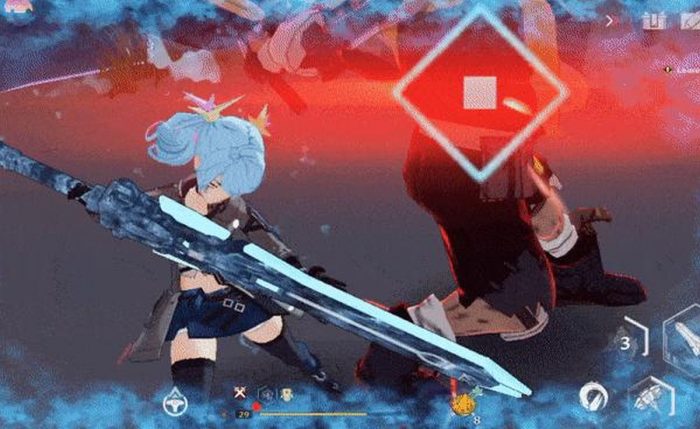
Discharge attacks are special skills the players can use when their weapons are fully charged with omnium – the mysteriously potent radioactive material that contaminated the world after a cataclysmic event.
Each weapon has its own unique discharge attacks, all of which are capable of dealing massive amounts of damage to the enemies.
It’s the game’s main bread-and-butter on increasing the player’s damage-per-second (DPS). But there is more to discharge attack than damage-dealing power moves.
At the same time, discharge attacks also provide helpful utilities in battle.
The moment a discharge activates, it instantly cleanses all debuffs from your character. That alone can flip the outcome of a fight when you’re getting stacked with negative effects from a boss.
On top of that, depending on your weapon, discharge attacks can inflict status effects, create barriers around you, immobilize targets, provide heals, and grant buffs to your allies.
They are great for dealing with bosses such as the Frost Bot, but also regular gameplay since they are extremely powerful.
And considering that the game allows you to switch between three weapons in battle, choosing the right combination is the key to achieving stellar damage numbers and outstanding overall battle performance.
You can only discharge your idle weapons
Before we talk about charging weapons, let’s get this out of the bag first. As previously mentioned, the games allow you to switch between three weapons in battle.
But although all three share weapon charges, you can only trigger a discharge attack by switching to your other idle weapons.
So if you’re actively using Weapon A and it hits full charge, you can’t discharge it while you’re holding it. Switching to Weapon B or C is what triggers the discharge.
Don’t worry though. The game allows players to overcharge their weapon up to 199%, and because a discharge attack only consumes 100% charge, you’ll be ready to discharge your favored weapon in no time.
Also read: How to Get Support Points in Tower of Fantasy
How to charge Tower of Fantasy Weapons

There are three ways to charge your weapons in Tower of Fantasy.
1. Dealing damage
This is the most obvious and straightforward method. Every hit you land on an enemy adds to the shared charge pool. The more consistently you attack, the more discharge attacks you get to trigger. It’s the same mechanic as building a super meter in traditional fighting games.
Your rate of charge buildup is not just about how hard you hit, though. Each weapon has its own Charge stat that determines how quickly it fills the meter while you’re actively using it.
The higher the Charge stat, the faster your meter climbs. This is worth paying attention to when building your loadout, especially if you want to cycle discharges frequently. I’ll go into more detail on that below.
2. Triggering a Phantasia via perfect dodge
A Phantasia is a phenomenon that occurs when you execute a perfect dodge, dashing away from an incoming enemy attack right before it hits you.
When you pull it off, a large dark spherical field appears around you, slowing all enemies within a 7-meter radius to a near-complete stop. Also, when it triggers, your weapons instantly gain enough charge to perform a discharge attack.
There is a cooldown to keep in mind: after triggering Phantasia, you cannot trigger it again for around 20 seconds.
Also read: Best Ways to Spend Vitality in Tower of Fantasy
3. Triggering a Phantasia via perfect weapon switch
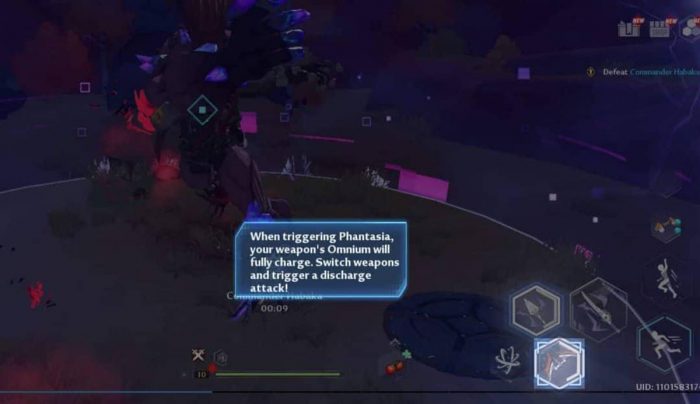
You can also trigger Phantasia by switching weapons at the perfect moment, not just by dodging.
The timing works the same way as the perfect dodge. When an enemy is about to strike, instead of tapping dodge, you switch to another weapon at the right instant.
If you nail it, Phantasia triggers just as it would from a dodge, giving you the slow field and an instant full charge.
This gives you a chance to bring in some variety into play and keep discharging – while you wait for the dodge timer to cool off, you can do a perfect switch.
Or at least experiment with both methods to see which one you’re able to master faster and do more often.
Phantasia in co-op
If you play with others, when you trigger a Phantasia, any teammates who step inside the sphere also receive enough charge to perform a discharge attack.
Note that if a teammate enters your Phantasia area, they also receive the Phantasia cooldown effect, so they won’t be able to trigger their own Phantasia for roughly 20 seconds afterward.
Also read: Tower of Fantasy: How to Change Servers
Things to Know about the Weapon Charge Stat

Now that we’ve got the three charging methods covered, we must talk about a stat that directly affects all of them: the Charge stat on each weapon.
Every weapon in ToF has a Charge value, and the higher that number, the faster the weapon builds up the shared charge meter while you’re using it.
In other words, a weapon that charges faster can mean more frequent discharge windows, which adds up significantly over a long fight.
Elemental traits and what happens at full charge
Reaching full charge does more than just unlock your discharge attack. Each weapon’s element applies a specific trait effect to the target with the next attack after hitting full charge.
Here is a quick breakdown of what each element does at full charge:
- Frost: Freezes the target for two seconds and leaves them frostbitten for six seconds. Breaking the ice shell deals bonus damage. While frostbitten, the target’s own weapon charge rate is reduced by 50%.
- Volt: Paralyzes the target for one second and electrifies them for six seconds, negating all active buffs and preventing them from receiving new buffs for that duration. Also deals bonus damage.
- Flame: Sets the target on fire for eight seconds, dealing ongoing damage every second. Ignited targets also receive reduced effectiveness from any healing.
- Grievous: Deals bonus damage and makes the target “grievous” for seven seconds, causing them to take increased damage from all sources.
These effects interact with your discharge attacks and your overall combo sequencing.
For example, a Frost weapon’s charge effect reducing the enemy’s charge rate is particularly useful in PvP, while Grievous pairs naturally with a high-DPS setup that wants to maximize incoming damage windows.
Conclusion
The game brings a unique complexity by featuring the integration of three weapon-switching system, the Phantasia phenomenon, and discharge attacks.
With so many interesting battle mechanics, Tower of Fantasy demands its players to be prudent with their weapon choice but be wildly adventurous in their play style. But so long as it’s fun, we are more than willing to follow.
Do you have any questions or things to add? Be sure to let us know by commenting below!

- Brain Puzzle 3: Crazy Mind Walkthrough: Level 41 to Level 50 - September 10, 2026
- Brain Puzzle 3: Crazy Mind Walkthrough: Level 31 to Level 40 - September 9, 2026
- Brain Puzzle 3: Crazy Mind Walkthrough: Level 21 to Level 30 - September 7, 2026